PDF文書に電子署名を追加
About oin-cloudINTRODUCTION
・allows you to send PDF documents to signers and add electronic signatures and timestamps.
・add text inputs, stamp images, dates, and hand-drawn signatures when applying an electronic signature.
*"Oin"[Ōin] means affixing a personal or corporate seal to a document to indicate approval, consent, or authorization in Japanese.
This is just a "trial" electronic signature cloud service.
The reasons are as follows
1.The electronic certificates used for signing are "self-signed" certificates generated with AWS KMS
2.The timestamping service is also based on an open-source timestamping solution (https://freetsa.org/index_en.php).
"Signature validity is unknown" may appear.
About the Electronic Signatures
The applied electronic signature follows the PAdES-T (Signature with Timestamp) level format.The signature format for documents is based on PAdES-Basic (adbe.pkcs7.detached),
using SHA-512 as the hash algorithm and RSA PKCS#1 v1.5 as the signature algorithm.
The timestamp format is DocTimeStamp, using the same hash and signature algorithms as the document signature.
For more details on PDF signature formats, please refer to the PAdES documentation.
Supported PDF Document Specifications
1.Non-PDF documents
2.Password-protected PDFs
3.Already signed PDFs
4.PDF over 2MB
5.PDFs containing form fields
6.PDFs created or modified using the latest Adobe Acrobat
(This service does not support streams and PDFs utilizing features from version 1.5 or later cannot currently be registered.Documents created using other PDF editors,such as latest PDFElement, are also not supported.)
Example documents that can be registered
1.A PDF exported as a PDF/XSP document from a document created in WORD or EXCEL.
2.PDFs exported from OpenOffice or LibreOffice.
How to use oin ー cloud.comFLOW
1.Sign up
To register and request a signature on a document, you must create an account. Register using your email address and password.
The video is explained in Japanese only.
A verification code will be sent to your email. Enter the code to complete the registration.
2.Profile Setup(option)
Register your name and company name (the registered company name + name will be displayed when forwarding documents).
3. Register a PDF Document
Upload the document to be signed (PDF only, max file size: 2MB).
Only one document can be registered for signing; attachments are not supported.4. Create a Signature Route
Add signers who need to sign the document. Set each signers name, email address, and signature attributes (whether they need to add additional inputs).
5. Configure Signature Inputs
Use this step if text fields, stamp images, or signature dates need to be entered during signing After saving the signature route, use click and drag & drop to specify input locations on the document. Each signer can have multiple input fields assigned.
6. Send the Document
The document will be forwarded in the order specified in the signature route.
7. Input, and Sign the Document
Signers will receive a signature request email from oin-cloud. By clicking the link in the email, they can open the document, review its contents, input necessary information, and sign it. The document link is valid for 7 days after being sent.
8. Rejecting a Document
If there are any issues with the document, the signer can reject it by providing a reason.
A rejection email will be sent to the document creator.9.Completing the Signature Process
Once all signers have completed their signatures, an email confirming completion will be sent to all parties in the route. By clicking the link in the email, users can access the signed document. The completion link remains valid for 7 days, so be sure to download and save the signed document.
About the "oin-cloud" Systemsystem design
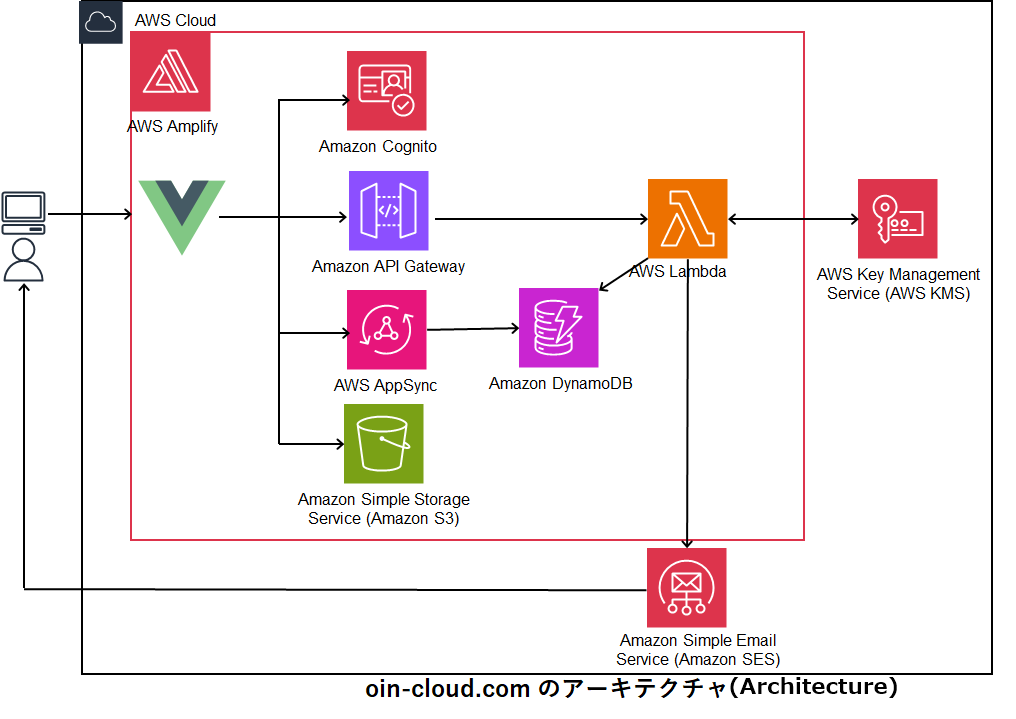
Key Open-Source Technologies Used
Many thanks to everyone who contributed to its development and maintenance.1.Backend
node-signpdf(https://github.com/vbuch/node-signpdf)
node-forge (https://github.com/digitalbazaar/forge)
2.FrontendPdf-editor(https://github.com/Perfect0B0D/Pdf-editer?tab=readme-ov-file)
Pdf-editor vue version(https://github.com/LibreSign/vue-pdf-editor)
3.TimeStampsfreeTSA.org (https://freetsa.org/index_en.php)